


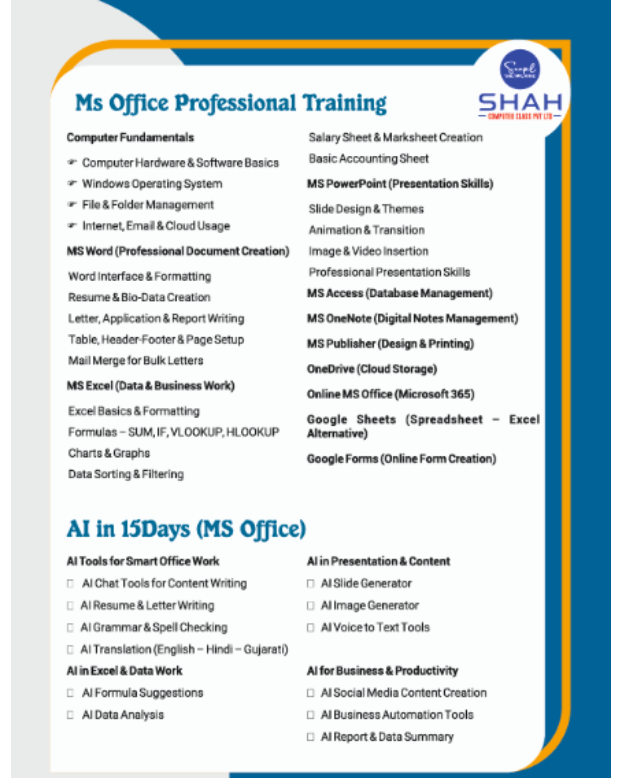
Microsoft Office skills are required across administration, accounting, sales, education, customer service and business operations. Yet many users know only the most basic commands and struggle when asked to create a professional report, organise a large worksheet or prepare a structured presentation.
An MS Office course in Karelibaug can help students, job seekers and working professionals develop the practical abilities needed for everyday office work. The value of the course lies not in memorising menu options but in learning how to complete tasks accurately and efficiently.
Professional Document Creation With Microsoft Word
Microsoft Word is used for much more than typing letters. Employees may need to prepare proposals, agreements, notices, reports, résumés and standard operating procedures.
A practical course should teach learners how to:
- Format headings, paragraphs and page layouts
- Create tables and structured forms
- Insert headers, footers and page numbers
- Use styles for consistent formatting
- Perform mail merge for bulk letters
- Review documents using comments and track changes
- Prepare print-ready files
- Protect documents when required
These skills are valuable for administrative professionals, educators, business owners and anyone responsible for formal documentation.
Data Organisation With Microsoft Excel
Excel is one of the most widely used workplace applications. Even entry-level positions may require candidates to enter data, apply formulas, sort records and prepare reports.
Learners should become comfortable with cell references, mathematical formulas, logical functions, filters, tables and charts. They should also understand how to check worksheets for errors and present information clearly.
For example, a sales coordinator may use Excel to track orders, while an accountant may organise expenses. A business owner might monitor inventory, payments and monthly performance. The same application supports different responsibilities when its features are used correctly.
Clear Presentations With Microsoft PowerPoint
PowerPoint helps users present information visually during meetings, training sessions, sales discussions and academic projects. A well-designed presentation communicates one idea at a time and avoids overcrowded slides.
Training should cover slide layouts, themes, images, charts, transitions and presenter tools. Learners should also understand basic design principles such as consistent fonts, readable colours and logical content flow.
The objective is not to add unnecessary effects. It is to make information easier for an audience to understand.
Better Email and Schedule Management
Depending on the course structure, learners may also receive guidance on professional email practices, calendar management and digital file organisation. These abilities often appear simple, but mistakes can affect workplace communication.
Useful habits include writing clear subject lines, organising messages into folders, sharing files responsibly and maintaining a logical folder structure. Students entering their first job can benefit significantly from learning these conventions before joining an organisation.
Why Hands-On Practice Matters
Watching a trainer perform a task does not create lasting proficiency. Students need to complete realistic assignments on their own.
Effective practice activities may include:
- Preparing a professional résumé in Word
- Creating an employee attendance sheet
- Developing a monthly expense statement
- Designing a product presentation
- Producing personalised letters through mail merge
- Formatting a business report
- Organising data using filters and tables
Assignments reveal where a learner needs additional support. They also provide examples that can be discussed during interviews or skill demonstrations.
Who Can Benefit From the Course?
An MS Office programme is suitable for school and college students, fresh graduates, job seekers, receptionists, office assistants, teachers, sales professionals and entrepreneurs. It can also help experienced employees who have learned informally and want to correct inefficient working habits.
Learners from Karelibaug and nearby areas of Vadodara should choose a batch that allows enough time for regular computer practice. Consistency is more valuable than completing modules quickly without applying them.
Shah Computer Class Pvt Ltd provides structured computer training for learners seeking practical workplace capabilities. Before joining, students should review the module coverage and ensure the programme includes supervised assignments rather than lecture-only instruction.
A strong understanding of MS Office can make routine work faster, more accurate and more professional. It also creates a useful foundation for advanced learning in Excel, Power BI, accounting software and other business applications.